
01 / The organization
Supporting a global industrial workforce
This global industrial manufacturing and power solutions company supports a distributed workforce across multiple regions and business functions. Its teams work across areas including engines, power generation, automotive components, and energy technologies.
Chime V5 brings employee support into a single Microsoft Teams entry point while allowing departments to retain their own workflows and dedicated agents.
02 / The story
Unifying access across support departments
Employees previously navigated different support channels depending on the department they needed. The company wanted one consistent entry point for internal requests without losing the specialized workflows of individual teams.
Approximately 300 agents work across different support departments. The organization needed a centrally managed platform with single sign-on and a way to bring additional departments onboard over time.
03 / The story
Moving beyond separate support channels
Employees had to find the appropriate department-specific support channel before they could ask for help.
The supplied account does not identify the previous support platforms or provide a measured before-and-after baseline.
04 / The story
One Microsoft Teams entry point for departmental support
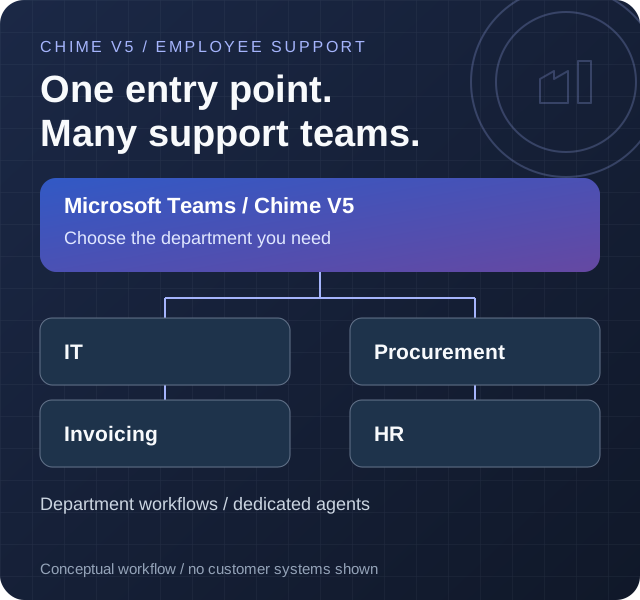
All support chats start in Microsoft Teams. Employees open the Chime V5 bot and select the department they need, rather than looking up separate channels or contact details.
Chime routes each conversation to the selected department's support team and dedicated agents. IT, Procurement, Invoicing, and HR are among the functions using the platform; each department retains its own support workflows.
The deployment supports approximately 300 agents and up to 10 onboarded departments, with additional departments planned. Centralized access management and single sign-on provide a common approach to platform access and administration.
Open Microsoft Teams
An employee starts a support conversation through the Chime bot.
Select a department
Choose the team that can help, such as IT, Procurement, Invoicing, or HR.
Route to the team
Chime directs the conversation to the selected department and its dedicated agents.
Follow the department workflow
The team handles the request within its own support workflow on the shared platform.
05 / The story
Reported chat activity and guest feedback
The supplied operational summary reports approximately 600 inbound chats per day. At that rate, 18,000 chats over 30 days is a projection, not a verified calendar-month total.
The summary reports 90% of chats connected to an agent. The denominator, underlying counts, and reporting period were not supplied, so the precise population behind this share is unknown. A connection is not necessarily a resolution.
Average speed to answer is reported as under 55 seconds; the measurement basis was not supplied, and the average is not a guarantee for every chat. The summary also reports that 75.15% of submitted guest ratings were five-star. The response count and full rating distribution were not supplied.
Reported employee support results
Chat activity, answer time, and guest feedback
Reporting period not supplied
About these results and how they were calculated
The supplied summary reports approximately 600 inbound chats per day, 90% of chats connected to an agent, average speed to answer under 55 seconds, and a 75.15% five-star share of submitted guest ratings. No dated dashboard export, underlying chat counts, connection-rate denominator, rating response count, full rating distribution, or answer-time measurement basis was supplied.
Approximately 18,000 chats is a 30-day projection calculated as 600 daily inbound chats multiplied by 30, not a measured calendar-month count. Connections do not establish resolutions. Average speed to answer is not resolution time and does not mean every chat was answered within 55 seconds.
06 / The story
How employees reach department-specific support
Employees start support chats in Microsoft Teams and select a department in the Chime V5 bot. Chime routes the conversation to the chosen department and its agents while supporting separate departmental workflows.
Single sign-on supports centralized access. This is a conceptual view of the supplied support journey, not a network or security diagram; the identity provider and other integrations were not specified.
Microsoft Teams
A shared entry point for employee support chats
Chime V5 bot
Department selection and centralized support platform
Single sign-on
Centralized access to the support platform
Department workflows
IT, Procurement, Invoicing, HR, and other teams retain their own workflows
Support agents
Approximately 300 agents assist employees across departments
Chime V5 technologies and features
- Route to Agents
Connect employees with the appropriate support team.
- Microsoft Teams integration
Bring Chime V5 support conversations into Microsoft Teams.
Microsoft technologies in this solution
- Microsoft Teams (opens in a new tab)
The shared entry point for all employee support chats.