
01 / The organization
Supporting a global scientific workforce
This global scientific solutions provider supplies products and services used in life sciences, biopharmaceutical, healthcare, education, and advanced technology. Its approximately 13,500 employees work across more than 30 countries, supporting customers in approximately 180 countries.
A geographically distributed workforce needs accessible support across languages and regions. Chime V5 brings employee support into Microsoft Teams, combining AI-powered self-service with access to specialized human agents.
02 / The story
Matching employees to language and specialist expertise
The support organization has approximately 50 specialized human agents working across English, Dutch, German, and French. Its L1 and L2 specialists cover eCommerce, application support, and procurement support.
The team needed a streamlined way to understand employee requests, offer self-service when appropriate, and connect employees to the right language and specialist expertise, with escalation for more complex issues.
03 / The story
Managing support requests in Microsoft Teams
Employee support requests arrived through Microsoft Teams. The support organization needed to match each request to the appropriate language and support area across its two levels of expertise.
The supplied account does not identify a previous support platform or provide a measured before-and-after baseline.
04 / The story
AI self-service and multilingual L1-to-L2 support
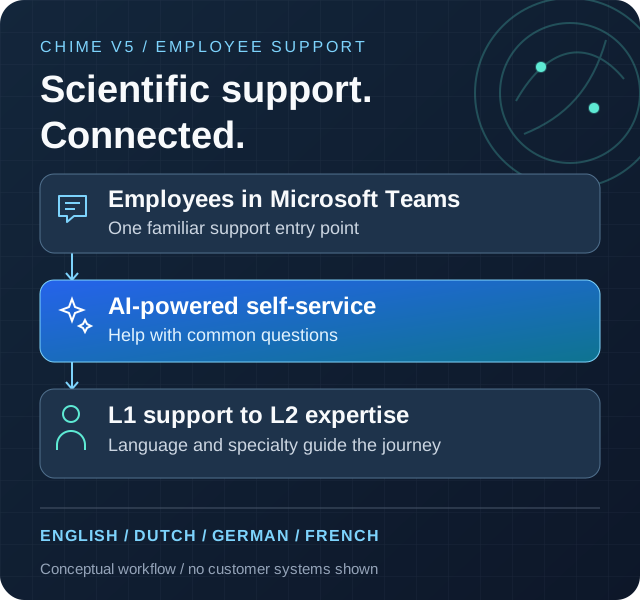
Employees start a support request in Microsoft Teams. Chime V5 first offers AI-powered self-service for common questions, then routes requests needing human assistance to L1 specialists according to language and support requirements.
The team supports English, Dutch, German, and French across eCommerce, application support, and procurement. When deeper technical or functional expertise is needed, L1 agents can escalate conversations to L2 specialists.
The result is a single support journey that combines self-service, specialized human assistance, and escalation within a familiar collaboration channel.
Start in Microsoft Teams
An employee opens a support request in a familiar channel.
Offer self-service
AI-powered assistance helps with common questions before human handoff.
Connect to L1
Route requests to specialists by language and support requirement.
Escalate to L2
L1 agents can involve specialists when an issue needs deeper expertise.
05 / The story
Reported chat volume, agent access, and guest ratings
The supplied operational summary reports approximately 30 inbound chats per day, with 94% of inbound chats connected to an agent. At that daily rate, 900 chats over 30 days is a projection, not a verified monthly total.
The summary reports that 14% of agent-connected chats quickly escalate to L2; no definition of 'quickly' or escalation timeframe was supplied. Average speed to answer is reported as under 30 seconds, not a guarantee for every chat.
The summary also reports that 88.35% of submitted guest ratings were five-star. Reporting dates, underlying chat counts, the rating response count, and the full rating distribution were not supplied; these results are not independently verified.
Reported employee support results
Chat activity, agent access, and guest feedback
Reporting period not supplied
About these results and how they were calculated
The supplied summary reports approximately 30 inbound chats per day, 94% of inbound chats connected to an agent, 14% of agent-connected chats quickly escalated to L2, average speed to answer under 30 seconds, and an 88.35% five-star share of submitted guest ratings. No dated dashboard export, underlying chat counts, rating response count, or rating distribution was supplied. The timeframe for 'quickly' was not defined.
Approximately 900 chats is a 30-day projection calculated as 30 daily inbound chats multiplied by 30, not a measured calendar-month count. Connections and escalations do not establish resolutions. Average speed to answer is not resolution time and does not mean every chat was answered within 30 seconds.
06 / The story
How employees reach self-service and specialists
An employee starts in Microsoft Teams, where Chime V5 offers AI-powered self-service and routes requests needing human assistance to language- and specialty-appropriate L1 agents. L1 can escalate complex conversations to L2.
This is a conceptual view of the supplied support journey, not a network or security diagram. The underlying AI provider and other integrations were not specified.
Microsoft Teams
Employee support entry point
Chime V5
Self-service, support routing, and escalation
AI-powered self-service
Assistance for common questions before human support
Language and support area
Four languages and eCommerce, application, or procurement support
L1 specialists
Human support matched to employee needs
L2 specialists
Escalation for deeper technical or functional expertise
Chime V5 technologies and features
- Intelligent chatbot workflows
Combine self-service with human assistance in a support workflow.
- Route to Agents
Connect support requests to the appropriate human expertise.
Microsoft technologies in this solution
- Microsoft Teams (opens in a new tab)
The employee entry point for support requests.