
01 / The organization
Supporting a K-12 school community
This small public school district in the United States primarily serves military-connected families. Across two campuses, it serves approximately 900–1,000 students from pre-kindergarten through Grade 12 and employs about 190 people.
English is the primary language of instruction, with English language development support available. The district also offers special and gifted education, counseling, technology-enabled learning, and enrichment such as robotics.
02 / The story
Capturing every inquiry without adding complexity
A small group of approximately five educators and staff members balances support inquiries with teaching and other responsibilities. Without a structured, centralized intake process, student questions risked being missed or left without clear ownership.
The district needed a simple way to capture each inquiry, route it to the right team, and keep a complete record in its existing InvGate ITSM platform without adding unnecessary administrative work.
03 / The story
Balancing student support with daily responsibilities
Educators and staff handled student questions alongside their primary roles. The district needed a consistent process for recording requests and tracking them through resolution.
InvGate was already the system in which inquiries needed to be logged. The supplied account does not identify the earlier intake process or provide a measured baseline for missed requests.
04 / The story
Microsoft Teams support with automated InvGate records
All student support chats start in Microsoft Teams, where students use the Chime V5 support interface. Each inquiry is captured and automatically creates a ticket in InvGate.
Chime routes inquiries to the designated human support team. Team members review requests, take ownership, communicate with students, and work toward resolution.
Ticket creation and updates are automated rather than performed manually. InvGate serves as the system of record for tracking each inquiry and documenting its resolution.
Start in Microsoft Teams
A student begins a support chat in Microsoft Teams using Chime V5.
Create a ticket
The captured request automatically creates a ticket in InvGate.
Route to the team
The designated support team reviews the inquiry and takes ownership.
Resolve and document
Team members assist the student while automated updates keep the InvGate record current.
05 / The story
Reported chat volume, answer time, and guest ratings
The supplied operational summary reports approximately 20 inbound chats per day. At that rate, 600 chats over 30 days is a projection, not a verified calendar-month total.
Average speed to answer is reported as under 30 seconds. This is an average, not resolution time or a guarantee that every chat was answered within 30 seconds.
The summary reports that 88.35% of submitted guest ratings were five-star. The reporting period, response count, and full rating distribution were not supplied, so the figure does not represent every chat.
Compliance is reported as 100%, but its definition, scope, denominator, and reporting dates were not supplied. It should not be interpreted as a regulatory compliance claim.
Reported student support results
Chat activity, answer time, and guest feedback
Reporting period not supplied
The definition, scope, denominator, and reporting period for this measure were not supplied.
About these results and how they were calculated
The supplied summary reports approximately 20 inbound chats per day, average speed to answer under 30 seconds, 100% compliance, and an 88.35% five-star share of submitted guest ratings. No dated dashboard export, underlying chat counts, rating response count, or full rating distribution was supplied. The compliance definition, scope, denominator, and answer-time measurement basis were not supplied.
Approximately 600 chats is a 30-day projection calculated as 20 daily inbound chats multiplied by 30, not a measured calendar-month count. Average speed to answer is not resolution time and does not mean every chat was answered within 30 seconds. The reported compliance figure does not establish regulatory compliance.
06 / The story
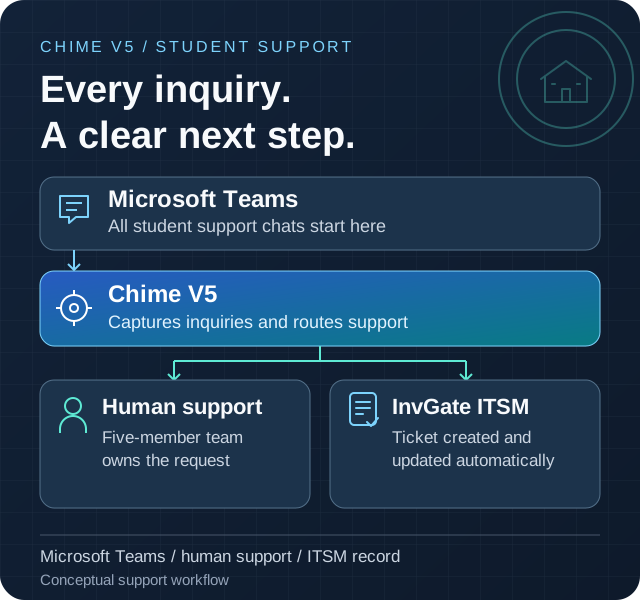
How Microsoft Teams chats reach the support team and InvGate
Students start all support chats in Microsoft Teams. Chime V5 captures and routes each inquiry to the human support team and automatically creates and updates the corresponding InvGate ticket.
This is a conceptual view of the supplied support workflow, not a network or security diagram. Other integrations were not specified.
Microsoft Teams
The entry point for all student support chats
Chime V5
Inquiry capture, support routing, and ticket automation
Support routing
Requests are directed to the designated team
Human support team
Five educators and staff members provide assistance
InvGate ITSM
Automatically created and updated tickets record requests and resolutions
Chime V5 technologies and features
- Route to Agents
Connect student inquiries to the designated human support team.
- Ticketing integration
Connect support conversations with the ITSM system of record.
Microsoft technologies in this solution
- Microsoft Teams (opens in a new tab)
The entry point for all student support chats.
07 / The story
Guest feedback
The supplied operational summary included these guest comments; dates and individual identities were not provided.
“your chat helped me update each user”
“quick and accurate service, thank you”
“Prompt and efficient”