
01 / The organization
Supporting citizens through workforce services
A US state workforce agency helps job seekers and employers while administering unemployment insurance and other workforce services.
Chime V5 connects citizens seeking unemployment assistance through the agency's website with a team of 55 support agents working in Microsoft Teams.
02 / The story
Helping citizens with time-sensitive unemployment inquiries
Citizens seek help with new or reopened unemployment claims, payment delays and blocked payments, claim settlements, bereavement-related inquiries, and Fact Finding forms. These situations can be time-sensitive and require guidance tailored to individual circumstances.
The agency needed a simple, centralized way for citizens to reach an agent through web chat while allowing its team to manage conversations in the Microsoft Teams client it already used.
03 / The story
Bringing citizen support into a familiar workflow
The agency's support team handled incoming citizen inquiries through a web chat channel. Agents needed to understand each person's situation and guide them through the appropriate process.
The supplied account does not identify the previous chat platform or provide a measured before-and-after baseline.
04 / The story
Website chat connected to agents in Microsoft Teams
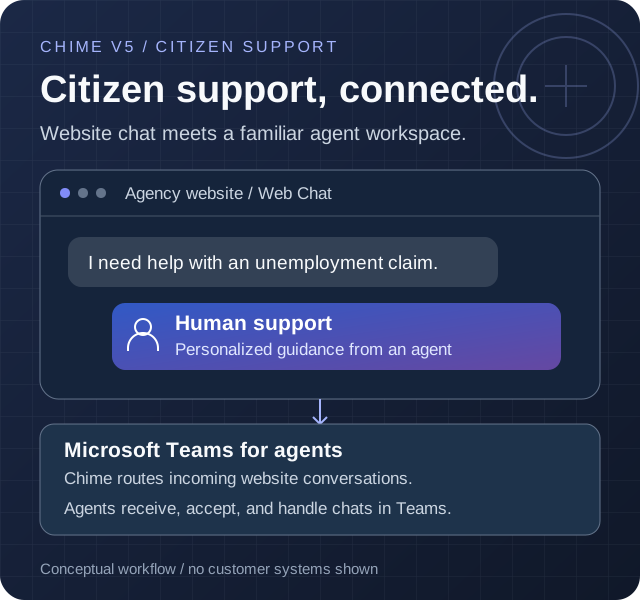
Citizens start a web chat directly on the agency's website without installing additional software. Chime V5 routes incoming conversations to the support team in Microsoft Teams.
Agents receive notifications, accept requests, and assist citizens from their familiar Teams client. Chime centralizes conversations so the team can manage inquiries and collaborate while providing personalized guidance.
The web chat and Teams connection gives citizens an accessible point of contact without requiring agents to adopt a separate standalone support application.
Start on the website
A citizen opens web chat without installing an application.
Connect to the team
Chime routes the incoming conversation to the support team.
Accept in Teams
An agent receives a notification and accepts the request in Microsoft Teams.
Receive personal guidance
The agent helps the citizen navigate their unemployment inquiry.
05 / The story
Reported web chat activity and guest feedback
The supplied operational summary reports 1,000 inbound web chats per month and a 91% connection figure for chats with agents. Its reporting period, underlying counts, and the precise definition and denominator for the connection figure were not supplied. A connection is not necessarily a resolution.
Average speed to answer is reported as under 51 seconds; the measurement basis was not supplied, and the average is not a guarantee for every chat. The summary also reports that 77.15% of submitted guest ratings were five-star. The response count and full rating distribution were not supplied.
Reported citizen support results
Web chat activity, answer time, and guest feedback
Reporting period not supplied
About these results and how they were calculated
The supplied summary reports 1,000 inbound web chats per month, a 91% connection figure for chats with agents, average speed to answer under 51 seconds, and a 77.15% five-star share of submitted guest ratings. No dated dashboard export, underlying chat counts, connection-figure definition or denominator, rating response count, full rating distribution, or answer-time measurement basis was supplied.
Connections do not establish resolutions. Average speed to answer is not resolution time and does not mean every chat was answered within 51 seconds.
06 / The story
How citizen chats reach the support team
Citizens start a conversation through web chat on the agency's website. Chime V5 routes the request to agents who receive and handle it in Microsoft Teams.
This is a conceptual view of the supplied support journey, not a network or security diagram. Other systems and integrations were not specified.
Website Web Chat
Citizens start unemployment support conversations
Chime V5
Centralizes and routes incoming web chats
Microsoft Teams
Agents receive notifications and accept conversations
Support team
55 agents provide personalized guidance to citizens
Chime V5 technologies and features
- Route to Agents
Connect website visitors with human support agents.
- Microsoft Teams integration
Bring Chime V5 support conversations into Microsoft Teams.
Microsoft technologies in this solution
- Microsoft Teams (opens in a new tab)
The familiar agent interface for receiving and handling citizen web chats.